

Quick answer: Writing fonts are single-line fonts that your Cricut can draw and fill in, and Cricut is the only source of true writing fonts. Most other fonts use a compound path, meaning two lines form each letter, so your pen draws just the outline instead of filling it in. To get around this, you can use a few hacks: pick a really skinny font like Betty B and make it small so the two lines touch and look filled in; flatten the text and turn it into a Print then Cut image; use a third-party app like Illustrator or Inkscape to add extra lines between the two so your machine fills them in; or let the machine draw the outline and fill it in by hand with a pen or marker. These work with Cricut pens as well as the debossing and foil tools.
What are writing fonts? Why don’t my fonts fill in when I write with them? What tips can I use with fonts with my Cricut to have my writing turn out beautifully every time?
We get questions about using fonts for writing with Cricut all the time. Luckily in this post, we’re going to break down some information you need to know about writing fonts and share some great writing fonts hacks you can use with your Cricut projects.

Writing Fonts Hacks for Cricut
You might want to use a writing font not only when you are going to be using Cricut pens, but for the debossing tool, or foil tool as well. These can add a lovely touch to many projects such as greeting cards, envelopes, wedding, and party invitations.
Check out our other helpful resources for writing with your Cricut machine:
How to write and address envelopes
How to write on the inside of your premade greeting cards
What are writing fonts?
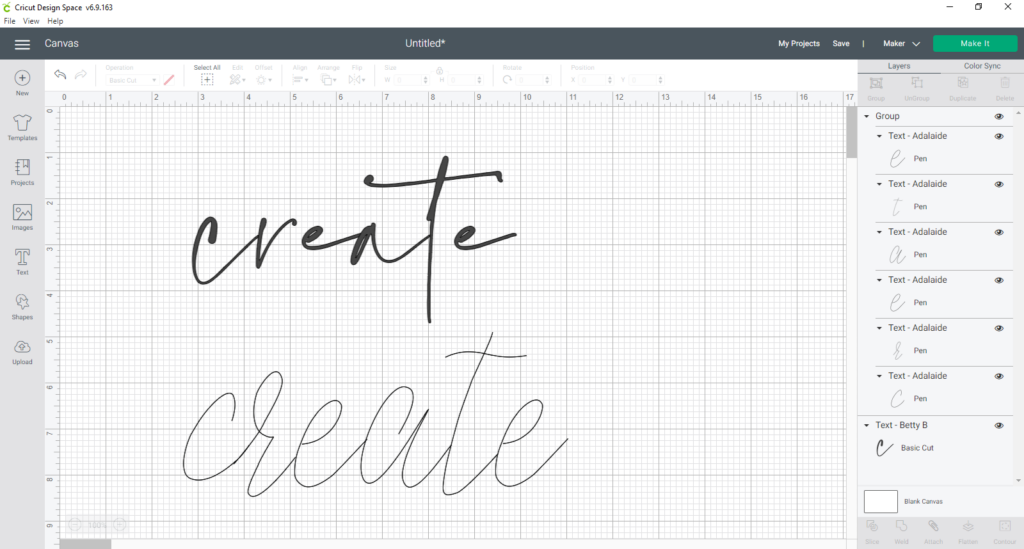
The first thing you need to know about writing fonts is that Cricut is the only one who can provide you with actual writing fonts. Either no one else has the technology for it at this point or Design Space simply doesn’t allow those fonts to be brought in and work for writing.

As you can see with this writing font from Cricut (font is called Adalaide and is the one at the bottom of the image), it is just one line. But, with the one at the top (Betty B, one of our fonts here at Makers Gonna Learn), you can see that there are two lines forming the letters.
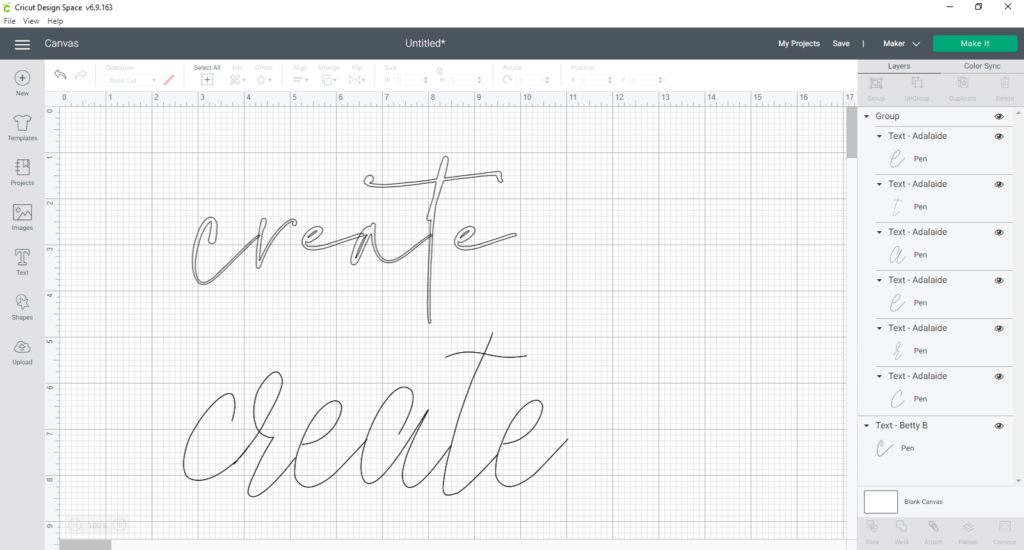
This is called a compound path and that is how other fonts are brought into Cricut Design Space. Cricut even has some non-writing fonts that are like this as well. The compound path where there are 2 lines instead of just 1 is the key difference between a writing font and a regular font.
There are some workarounds for this. We’ve got some hacks for you that can help.

1 – If you use a really skinny font like Betty B and can make it quite small for your project, that will decrease the distance between the two lines. By the time your Cricut pen or foil draws both of the lines, they are likely to touch and look like a filled in font.

2 – Or, if you want to use a thicker font, you could flatten it and turn it into a Print then Cut image.
3 – Use a third-party design app like Illustrator or Inkscape to go in and create additional lines in between the two lines of the font to fill it in. You’ll pull your text into this app and add extra points/lines. Then, you’ll save it and import it into Design Space. Your machine will then draw or foil those extra lines to give that filled-in appearance.
4 – Another option is to let your machine create the outline of the text for you and then you can go in and manually fill it in with a pen or marker. This isn’t ideal if you have a lot of text but may work in some situations.
These are some great hacks for getting your Cricut machine to write with pens and markers the way you’d like it to. Give it a try and see which one works the best for you!
Frequently Asked Questions
Why don’t my fonts fill in when I write with them?
Most fonts use a compound path, where two lines form each letter, so your Cricut only draws the outline. True writing fonts are a single line that fills in, and Cricut is currently the only one that provides actual writing fonts.
Can I make a regular font look filled in when writing?
Yes, there are hacks. Use a skinny font like Betty B made small so the two lines touch, flatten it into a Print then Cut image, or add extra lines between the two lines in an app like Illustrator or Inkscape so your machine draws them in.
Are writing fonts only for Cricut pens?
No. You might want a writing font for Cricut pens, but also for the debossing tool or foil tool. These can add a lovely touch to projects like greeting cards, envelopes, and wedding or party invitations.


