

Quick answer: Avoid these four common Cricut business mistakes: selling crafts with fonts that haven’t been kerned, shipping products without care instructions, not sealing your projects, and not packing items well for shipping. Kerning (moving letters closer and welding script fonts so they join) takes projects from beginner to professional. Care instructions keep customers satisfied and coming back, sealing extends a product’s lifespan, and careful packing protects items so they arrive undamaged.
When you’re just starting out with a new craft business, it can feel so overwhelming. There is just so much to think about! It’s easy to make some Cricut business mistakes that cost you time, money, and customers and we want to help you avoid those.
Often, it’s those mistakes you might not have realized you were making that could cause problems with selling your Cricut projects and turning your business into a profitable one! We’ll show you what those are and how to fix them.
The first step to building a Cricut business you love is to grab our FREE Roadmap to Success. Our roadmap gives you a step-by-step plan to starting a successful Cricut crafting business right from your own home. We’ll show you the steps you need to take to start a business that you love AND that brings in a profit!

Cricut Business Mistakes
We’re going to talk about the 4 most common mistakes people make when starting a business using Cricut. Let’s get started!

Supplies we used:
- Ballin Font
- Mary Katherine Font
- Envelopes
- Bubble Mailers
- Pink Bubble Mailers
- Minwax Polyurethane Clear Satin Spray Sealer
- Minwax Polycrylic
- Outdoor Mod Podge
- Dishwasher Safe Mod Podge
1 – Selling crafts with fonts that haven’t been kerned.
We talk about this one often! Kerning your fonts means moving them closer together and in the case of script fonts, ensuring that they join. Cricut has recently added automatic kerning for some fonts, but it’s important to know how to do it yourself because this function often needs some tweaking.
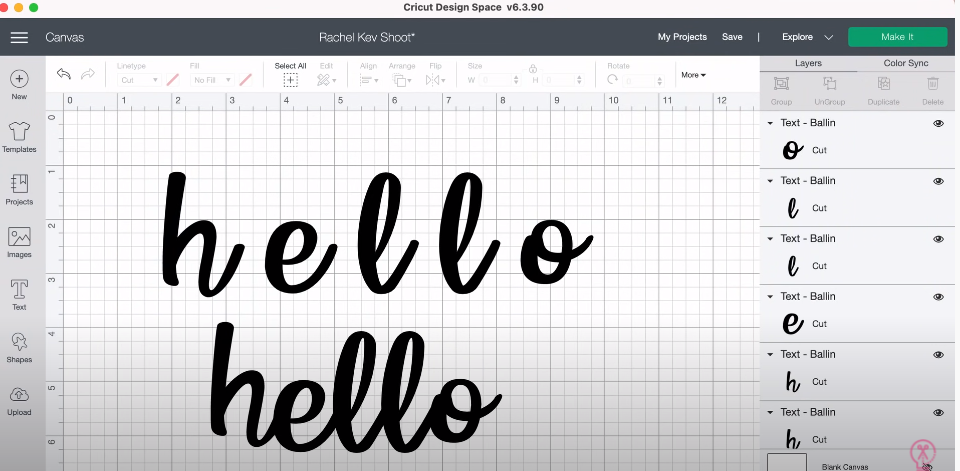
Kerning your fonts takes your projects from beginner to professional and can make a huge difference in being able to sell your crafts. The text at the top of our Cricut Design Space canvas is not kerned and the word below is. See how much better that looks?
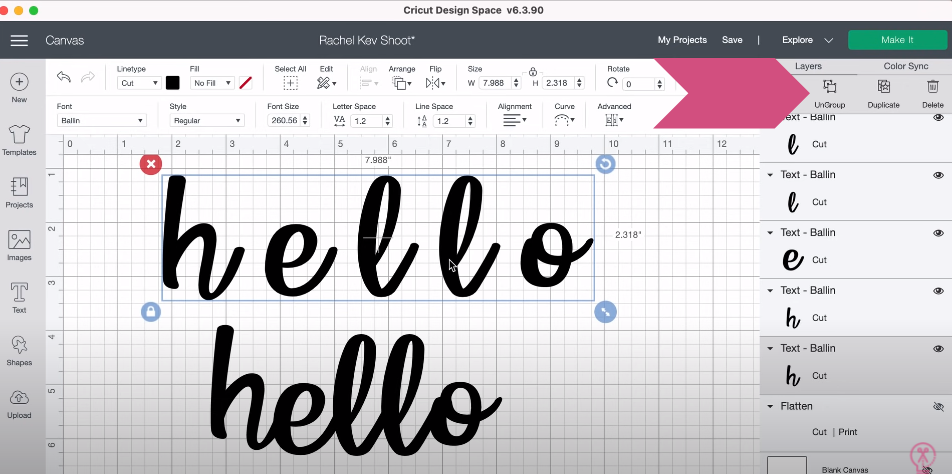
To kern your cursive fonts, begin by selecting your text. Go to the top of the Layers Panel and choose Ungroup. Now the letters can be moved independently of each other.
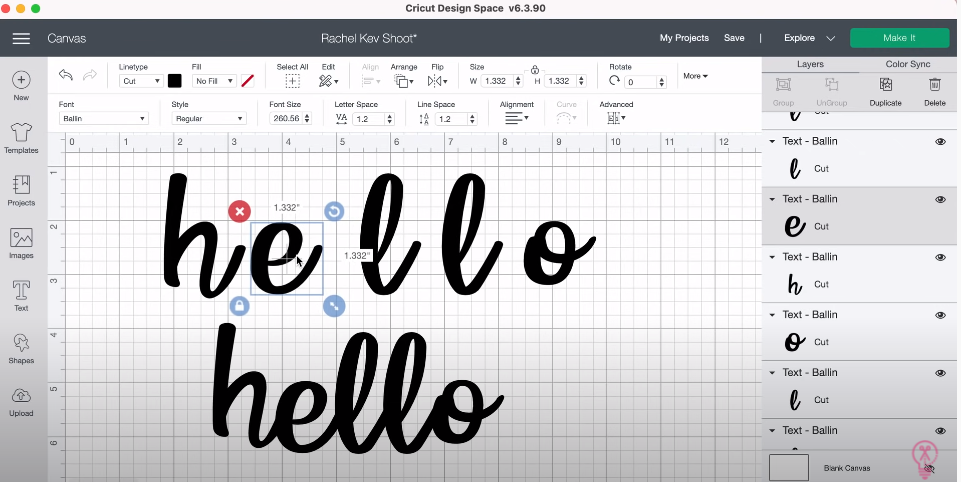
Select the 2nd letter in your word. Use the arrow keys on your keyboard to move that letter closer to the first one. This keeps it in line with the other letters and helps prevent it from being moved up or down accidentally. Continue until the whole word is kerned.

Don’t forget to weld.
Once the word is fully kerned, you need to select the whole word, and over at the bottom of the Layers Panel, choose Weld. If you don’t weld, your word will cut out in order but each of the letters will still be treated as a separate layer. If you look at our example above where we changed it from a Cut to a Draw line (so you can visualize it better), every place where you see those letters overlapping is going to be a cut.
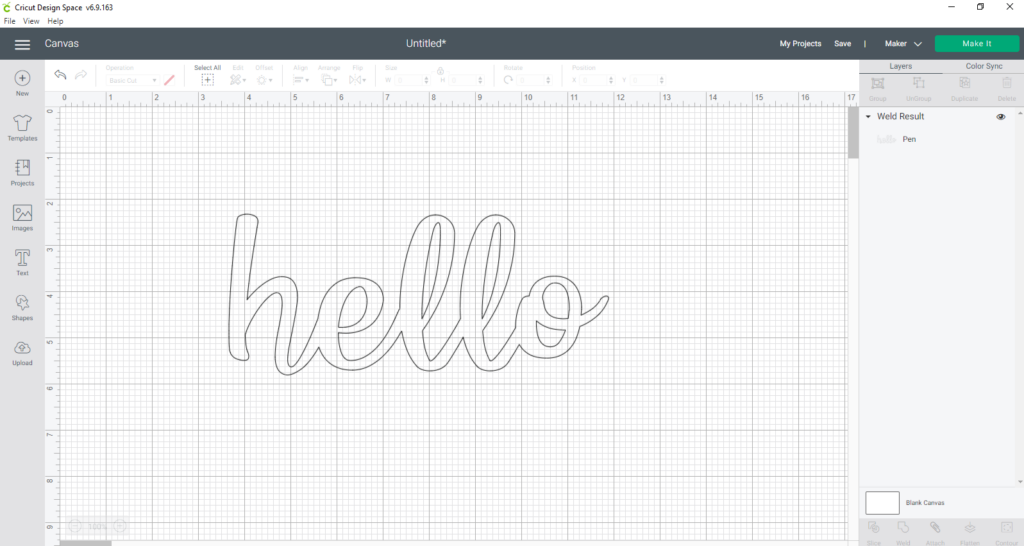
This shows you what the word looks like after welding. The letters join together seamlessly in one layer.
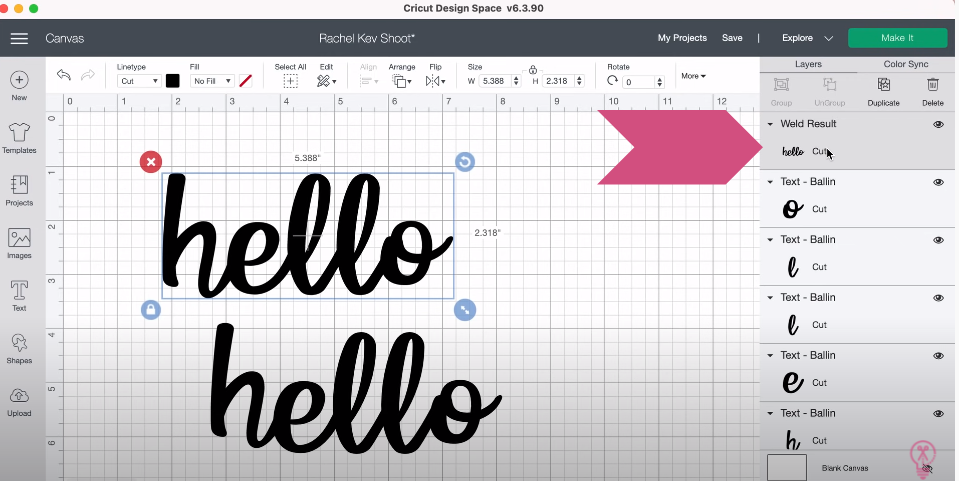
Now your word will show up in the Layers Panel as just one layer instead of individual layers for each letter.
2 – Shipping out your products without care instructions.
It’s so important to let your customers know how to properly care for your products. You want them to last as long as possible and for your customers to be satisfied with them, so this step is essential. A satisfied customer is often a repeat customer and one who will sing your praises to others as well!

For example, if you’re shipping out t-shirts, you may want to advise them to turn them inside out before washing in cold water. With unsealed mugs, you will want to let them know to hand wash them and that they aren’t dishwasher safe and so on. By helping your customers care for the items they purchase from you, you’ll help them get the most out of what they buy.
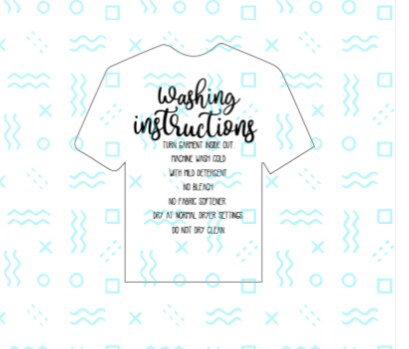

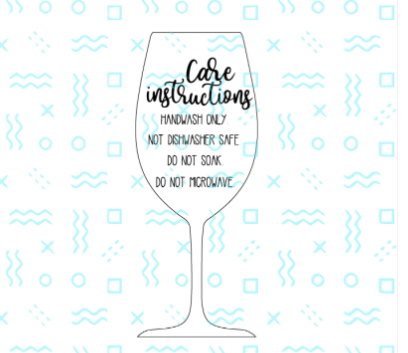


We have some care tag cut files that you can use for many of these items:
Mug care – unsealed (mug shaped)
Tumbler care – unsealed (tumbler shaped)
Wine glass care – unsealed (wine glass shaped)
You can also easily create your own custom tags in Design Space. Remember if you are sealing your products, you need to be sure that your customers know that they need to wait for the curing time to be up before using it. This is really important to make it long-lasting, food-, and dishwasher-safe.
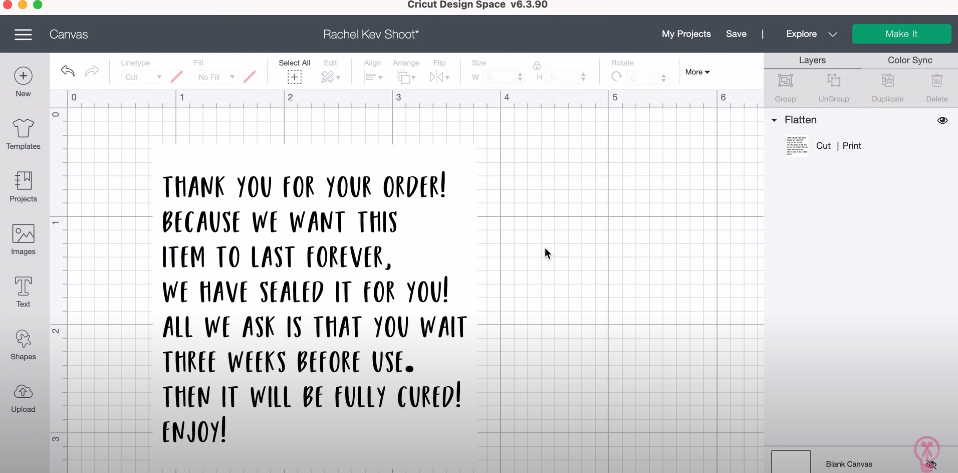
We wrote up the text that we wanted and then welded it to a plain white square. We flattened our design to make it a simple print then cut. You can use this again and again and tuck it inside your shipments.
3 – Not sealing your Cricut projects.
You can either choose to go ahead and seal your mugs, tumblers, and other similar products and include that in the price or you can offer this as an extra service for your customers at an additional cost.
Sealing your projects will obviously increase their lifespan and give your customers more value for their money. If you are sealing them, be sure to let your customers know and to give them the appropriate care instructions.

This is a great option to offer your customers and will be a bonus to your business. If you choose to offer it, be sure to tell your customers all about the benefits of sealing and how it can extend the life of their purchases as well as making them easier to care for (putting them in the dishwasher as opposed to having to hand wash for example). As a business owner, helping your customers to make informed decisions helps you appear more professional and can give you an edge over other sellers.
We’ve got some amazing tips to ensure that your products are sealed correctly here –
How to make waterproof stickers with your Cricut
Making Cricut projects dishwasher safe

4 – Not packing your items well for shipping.
This is so important! We’ve got five major points you need to follow when packing your items for shipping:
- Use proper-sized packaging for the item you are shipping. Too big and you’re going to be wasting money by increasing your shipping costs. You’ll also need more packing materials inside to keep it safe from bouncing around. Too small and you won’t be able to provide any cushioning to protect it from damages from being bumped and banged into during shipping.
- As mentioned, you need the correct packing filler to keep your item safe from damage. Fill in gaps with paper. If your item is fragile, use bubble wrap.
- You need to use good packing tape. Your package may be tossed around a bit during shipment or it may encounter different weather conditions (humidity, for example) and you want your tape to hold up. This is especially important in large, heavy packages that tend to be more prone to packing tape issues.
- The bottom line is that you want to keep it safe. There’s nothing worse for a customer to order something they’re really excited about and then open the package to find it broken. Do what you can to pack it with care – think ahead to what could happen to your package along the way and prepare for it.
- Keep it professional. You want your packaging to look very intentional. Create custom labels for it to match your branding. Look for packing materials in your brand colors. Be sure to include those product care instructions and a thank you note – these extra little touches make you look more professional and present a positive impression to your customers.

More shipping tips: How to pack and ship vinyl decals
By avoiding these mistakes, you can get your new craft business started on the right foot. We can’t wait to watch you grow!
Frequently Asked Questions
Why does kerning fonts matter when selling Cricut crafts?
Kerning means moving your letters closer together and, for script fonts, making sure they join. It takes your projects from beginner to professional and can make a big difference in being able to sell your crafts. Once kerned, remember to select the whole word and Weld so it cuts as one layer.
Should I include care instructions with my products?
Yes. Care instructions help your products last and keep customers satisfied, and a satisfied customer is often a repeat customer. For example, tell t-shirt buyers to turn shirts inside out and wash in cold water, and let unsealed mug buyers know to hand wash.
How should I pack Cricut products for shipping?
Use proper-sized packaging, add the right filler (paper for gaps, bubble wrap for fragile items), and use good packing tape that holds up to handling and weather. Keep it professional with custom labels, brand-colored materials, care instructions, and a thank you note.


